

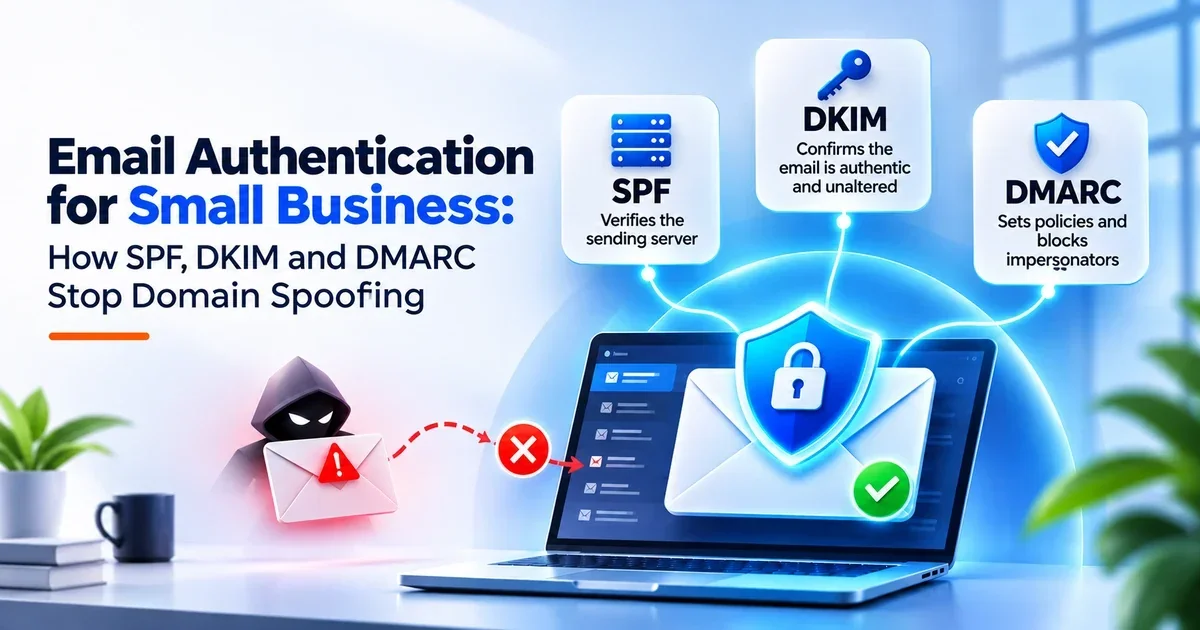
Email Authentication for Small Business: How SPF, DKIM and DMARC Stop Domain Spoofing
Since May 2025, Microsoft Outlook has been rejecting mail outright from domains that send more than 5,000 messages a day without proper SPF, DKIM and DMARC records in place — bounced back with a blunt “does not meet the required authentication level” error, according to Microsoft’s own announcement. Google moved first, in February 2024, making the same three records mandatory for bulk senders to Gmail.
Email authentication for small business owners is no longer an optional technical nicety. Most Turlock-area businesses don’t send 5,000 emails a day, so it’s easy to assume this isn’t about them — but those thresholds are simply the floor the whole email industry is now building on, and the records that keep a bulk sender out of the junk folder are the same ones that stop a stranger from sending invoices in your company’s name.
What Email Authentication for Small Business Actually Does
Plain SMTP — the protocol your email still runs on — never verified who was sending anything. Anyone with a mail server can type your domain into the “From” field, and without authentication records the receiving server cannot tell that message apart from one your bookkeeper actually sent.
Email authentication closes that hole. You publish a small set of DNS records telling every receiving mail server which systems may send on your behalf, and what to do with anything that isn’t on the list — the difference between a signature anyone can forge and one the bank can verify. That is the whole of email authentication for small business: a public statement of who is allowed to send as you.
SPF, DKIM and DMARC in Plain English
The three records do separate jobs, and they only work properly together:
- SPF (Sender Policy Framework) is the guest list. It names every server and service permitted to send email using your domain — your Microsoft 365 tenant, your CRM, your invoicing platform, your website’s contact form.
- DKIM (DomainKeys Identified Mail) is the tamper seal. Your mail server signs each outgoing message with a private key, and receivers check that signature against a public key in your DNS to confirm nothing was altered in transit.
- DMARC (Domain-based Message Authentication, Reporting and Conformance) is the instruction sheet. It tells receiving servers what to do with mail that fails SPF and DKIM — ignore it, quarantine it, or reject it — and sends you reports on who is sending mail as your domain.
SPF and DKIM without DMARC is the common half-finished state. The checks run, the message fails, and the receiving server shrugs and delivers it anyway because you never said otherwise.
Why Microsoft and Google Forced the Issue
Both providers were drowning in spoofed mail their filters couldn’t reliably separate from real business email, so they pushed the responsibility back to domain owners. Google’s sender guidelines now require SPF or DKIM from every sender, and all three records from anyone sending 5,000 or more messages a day to Gmail. Microsoft followed with outright rejection rather than junk-foldering, and Yahoo and Apple have comparable rules. The practical effect: unauthenticated email is becoming undeliverable email.
What It Costs to Skip It
Skipping email authentication for small business domains creates two separate problems, and owners usually only notice the first one:
- Your legitimate email stops arriving. Quotes land in spam folders, password resets never show up, and a prospect concludes you never replied. There’s no bounce message to warn you — the mail is simply filtered, quietly, on the recipient’s side.
- Anyone can impersonate you. An attacker sends a payment-redirect email that genuinely appears to come from your domain, to your customers, using your company name. The recipient’s mail server has nothing to flag, because you never published a policy saying who is allowed to send as you.
That second problem is how most invoice fraud starts — we covered the mechanics in our breakdown of business email compromise in 2026. Email authentication removes the easiest version of that attack from the table, which is why email authentication for small business owners is worth treating as a security control rather than a deliverability chore.
How to Check Where Your Domain Stands Today
Auditing your current email authentication for small business setup takes about ten minutes:
- Look up your domain’s TXT records with any public DNS lookup tool. One record starting with
v=spf1means SPF exists; none means it doesn’t. - Check for a TXT record at
_dmarc.yourdomain.com. If nothing comes back, you have no DMARC policy at all — the most common finding in our cybersecurity assessments. - If a DMARC record does exist, read the
p=value.p=noneis monitoring only and blocks nothing.p=quarantineandp=rejectare the ones that actually stop spoofed mail. - Send a test message to a Gmail account, open it, and view the original. Gmail reports PASS or FAIL for SPF, DKIM and DMARC on every message it receives.
Rolling Out DMARC Without Breaking Your Email
So many domains sit at p=none forever because of one real fear: enforce it carelessly and you block your own invoicing platform. The sequence that avoids that:
- Inventory every sender first. List every system that sends mail as your domain — accounting software, marketing platform, booking system, support desk, scanner, anything. Missing one is what breaks a rollout.
- Publish SPF and DKIM for all of them, then confirm each service is signing correctly.
- Start at
p=nonewith reporting on. You’ll get aggregate reports showing exactly who is sending as your domain, including senders you forgot and senders you never authorized. - Move to
p=quarantineonce the reports show only legitimate traffic passing, and watch for a couple of weeks. - Finish at
p=reject. This is the only setting that actually refuses spoofed mail, and it’s the goal — monitoring mode protects nothing on its own.
The Mistakes That Undo It
Most failed email authentication for small business rollouts come down to the same handful of errors:
- Multiple SPF records on one domain. The spec permits exactly one. Two records make SPF fail entirely, which is worse than having none.
- Blowing the SPF lookup limit. SPF allows ten DNS lookups; chaining enough third-party
include:statements silently breaks the record. - Stopping at
p=none. Monitoring mode is a step, not a destination. - Leaving parked and lookalike domains unprotected. Domains you own but never send from are prime spoofing material. Every one of them should carry an SPF record with no authorized senders and a
p=rejectDMARC policy. - Treating it as a one-time task. Add a new marketing tool six months from now and SPF needs updating, or that tool’s mail starts failing.
- Assuming it replaces MFA. Authentication stops spoofing of your domain; it does nothing about a password that’s already been stolen. The two work as a pair, which is why we pair it with password managers and MFA.
Frequently Asked Questions
Q1: Does email authentication stop phishing emails from reaching my staff?
No — it stops attackers from spoofing your domain. Inbound phishing from domains you don’t control is a separate layer: filtering, MFA and training.
Q2: We only send a few hundred emails a day. Do these rules apply to us?
The 5,000-per-day thresholds are where rejection becomes automatic, but spam scoring applies to everyone. Lower-volume senders without authentication aren’t rejected outright — they’re filtered more aggressively, with no notification. Email spoofing protection matters at every volume.
Q3: How long does email authentication setup take?
SPF, DKIM and DMARC setup is quick on paper — the DNS records themselves take under an hour. The honest timeline is two to six weeks, because the sender inventory and the staged move from monitoring to enforcement are what prevent an outage.
Q4: Microsoft 365 handles this automatically, doesn’t it?
Partly. Microsoft 365 provides a default SPF include and can enable DKIM, but it does not publish a DMARC policy for you, and it knows nothing about the third-party platforms that also send as your domain. Those gaps are yours to close.
Q5: What does DMARC reporting actually tell me?
Receiving servers send daily summaries of every message claiming to be from your domain, with pass/fail results and source IPs. It is often the first time a business sees how many parties are already sending mail in its name.
Find Out What Your Domain Is Telling the World
If you don’t know whether your domain has a DMARC policy — or whether it’s set to anything that actually blocks spoofing — that’s worth ten minutes of someone’s attention. We handle email authentication for small business clients across Turlock and Modesto: our managed IT services include SPF, DKIM and DMARC setup plus ongoing DMARC monitoring as standard, and a free cybersecurity audit shows exactly where your records stand today. Contact VaultEdge IT and we’ll run the check for you.