
Windows App Migration: The Complete Guide to Microsoft Remote Desktop End of Support (2026)
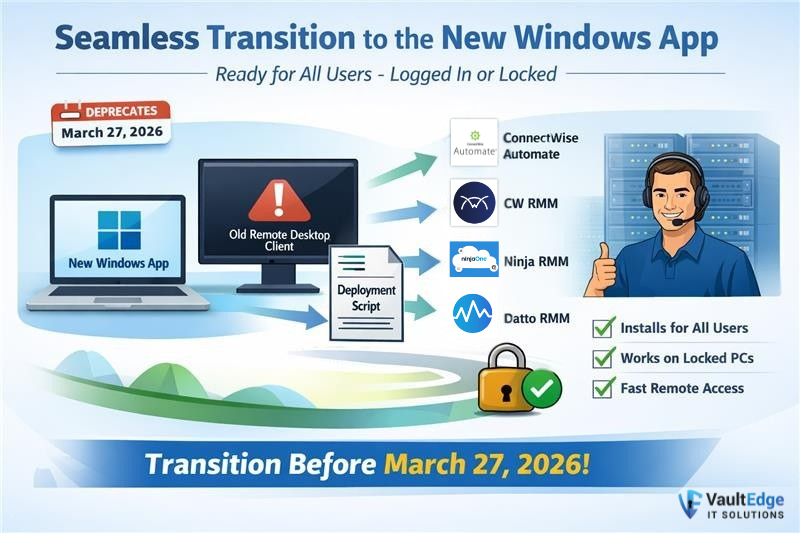
Windows App Migration is now a business-critical priority as Microsoft officially retires the Remote Desktop Client on March 27, 2026. Organizations that do not migrate to Microsoft’s new Windows App risk losing access to Azure Virtual Desktop, Windows 365, and remote work environments that power their daily operations.
This change is not optional. It is a forced platform replacement — and companies that delay will face downtime, security gaps, and user lockouts.
At VaultEdge IT Solutions, we help businesses complete Windows App Migration automatically, silently, and without user disruption.
What Is Windows App Migration?
Windows App Migration is the process of replacing the legacy Microsoft Remote Desktop Client with Microsoft’s new Windows App, which is now the official connection platform for:
-
Azure Virtual Desktop
-
Windows 365
-
Dev Box
-
Remote PCs
Microsoft has consolidated all remote connectivity into this single application.
Official Microsoft documentation confirms this transition:
The old Remote Desktop Client will stop being supported after March 27, 2026 — meaning no security updates, no fixes, and no guarantees it will continue working.
Why Microsoft Remote Desktop Client Replacement Is Mandatory
When Microsoft ends support for a core application, it creates three major risks:
-
Security exposure – Unsupported software becomes a target
-
Operational failures – Apps break as cloud platforms update
-
Compliance issues – Using unsupported software violates many IT policies
This is why Microsoft Remote Desktop Client replacement is not optional — it is required for compliance, security, and business continuity.
Why Manual Windows App Migration Fails
Many IT teams assume users can simply install the new Windows App themselves.
In reality, manual Windows App Migration causes:
-
Some users never install it
-
Some keep using the old client
-
Some install the wrong version
-
Helpdesk tickets spike
-
Business productivity drops
This is why enterprise environments require automated Windows App Migration — not email instructions.
The Hidden Problem: Legacy RDP Migration
A successful legacy RDP migration requires more than installing the new Windows App.
If the old Remote Desktop Client remains on the system:
-
Users launch the wrong application
-
Sessions fail
-
IT receives endless support tickets
A real Windows App Migration must do two things:
✔ Install the new Windows App
✔ Remove the legacy Remote Desktop Client
Automatically.
How VaultEdge IT Automates Windows App Migration
VaultEdge IT Solutions has developed a dual-script automation system that performs a complete enterprise Windows App Migration.
Our solution:
✔ Installs the Windows App silently
✔ Removes the legacy Remote Desktop Client
✔ Runs even when no user is logged in
✔ Works across all major RMM platforms
✔ Prepares machines before users log in
This prevents confusion, downtime, and support overload.
Works with Your Existing RMM
VaultEdge’s automated Windows App Migration integrates with:
-
ConnectWise Automate
-
ConnectWise RMM
-
Ninja RMM
-
Datto RMM
-
Syncro RMM
No new software is required. We deploy directly through your existing IT management stack.
Learn more about our managed automation services here:
Supports Azure Virtual Desktop & Windows 365
The new Windows App is required for Microsoft’s modern remote platforms:
Without Windows App Migration, access to these platforms becomes unreliable and eventually unsupported.
Business Benefits of Automated Windows App Migration
After VaultEdge completes your Windows App Migration, you get:
✔ Zero downtime
✔ Zero user confusion
✔ Fewer support tickets
✔ Microsoft compliance
✔ Secure cloud access
✔ Future-ready endpoints
Your employees simply log in — and everything works.
Why Windows App Migration Should Start Now
Many organizations plan to wait until 2026. This is a mistake.
As Microsoft’s deadline approaches:
-
IT support queues explode
-
Devices are missed
-
Install failures rise
-
Emergency upgrades cost more
A proactive Windows App Migration avoids:
-
Overtime IT work
-
User frustration
-
Compliance risks
-
Business disruption
VaultEdge ensures every device is upgraded, verified, and cleaned automatically — long before it becomes urgent.
Download the Free 2026 Windows Migration Guide
To help organizations prepare, VaultEdge IT created a free PDF:
The 2026 Windows Remote Desktop Survival Guide
How to Migrate to the New Windows App Without Downtime
Inside the guide:
-
What Microsoft’s shutdown means
-
How Windows App works
-
Why manual upgrades fail
-
How to automate Windows App Migration
-
How to avoid last-minute chaos
✅ FAQ
Q1: What is Windows App Migration?
A: Windows App Migration is the process of replacing the legacy Microsoft Remote Desktop Client with Microsoft’s new Windows App. It ensures continued access to Azure Virtual Desktop, Windows 365, and remote work environments after Microsoft ends support for the old client in 2026.
Q2: When does Microsoft Remote Desktop Client stop working?
A: Microsoft has announced that the legacy Remote Desktop Client will reach end of support on March 27, 2026. After this date, it may stop working or become insecure, making Windows App Migration mandatory.
Q3: Why is Windows App Migration important for businesses?
A: Windows App Migration is important because it prevents downtime, security risks, and user lockouts. Without upgrading, businesses may lose access to cloud desktops, remote PCs, and Microsoft’s modern virtual desktop platforms.
Q4: Can Windows App Migration be automated?
A: Yes. VaultEdge IT provides fully automated Windows App Migration using RMM tools that silently install the Windows App and remove the old Remote Desktop Client without user involvement or downtime.
Q5: What happens if we keep using the old Remote Desktop Client?
A: Continuing to use the legacy Remote Desktop Client after Microsoft’s deadline can lead to security vulnerabilities, login failures, and compliance issues. This is why Windows App Migration should be completed before March 27, 2026.
Q6: Does Windows App Migration work with Azure Virtual Desktop and Windows 365?
A: Yes. The Windows App is the official connection platform for Azure Virtual Desktop, Windows 365, and Dev Box. Migrating ensures stable and secure access to all Microsoft cloud desktop services.
Q7: How do I get started with Windows App Migration?
A: You can start by requesting a free Windows App Migration assessment from VaultEdge IT Solutions. They analyze your environment, identify risk, and automate the entire migration process.
Get a Free Windows App Migration Assessment
VaultEdge IT Solutions will:
-
Scan your environment
-
Identify risk
-
Plan a phased rollout
-
Automate everything
📧 support@vaultedgeit.com
📞 +1-916-516-1202
🌐 https://vaultedgeit.com
Windows App Migration does not need to be painful.
Let VaultEdge make it effortless.